How to Reconcile Your Budget With Your Bank Balance in 2026
Trying to reconcile your budget with your bank balance in 2026? Here is a practical way to explain the gap, separate transfers from spending, handle pending transactions, and keep your budget aligned with real cash.
A budget can say groceries are under control while your checking account is 312 dollars lower than expected, and both numbers can still be telling the truth. That is usually when people search how to reconcile your budget with your bank balance.
The problem is rarely basic math. Usually the budget, the bank balance, and the pending activity are describing different layers of the same money, and somewhere along the way those layers stopped lining up.
The goal is not to force every number on the screen to match. The goal is to make the gap explainable.
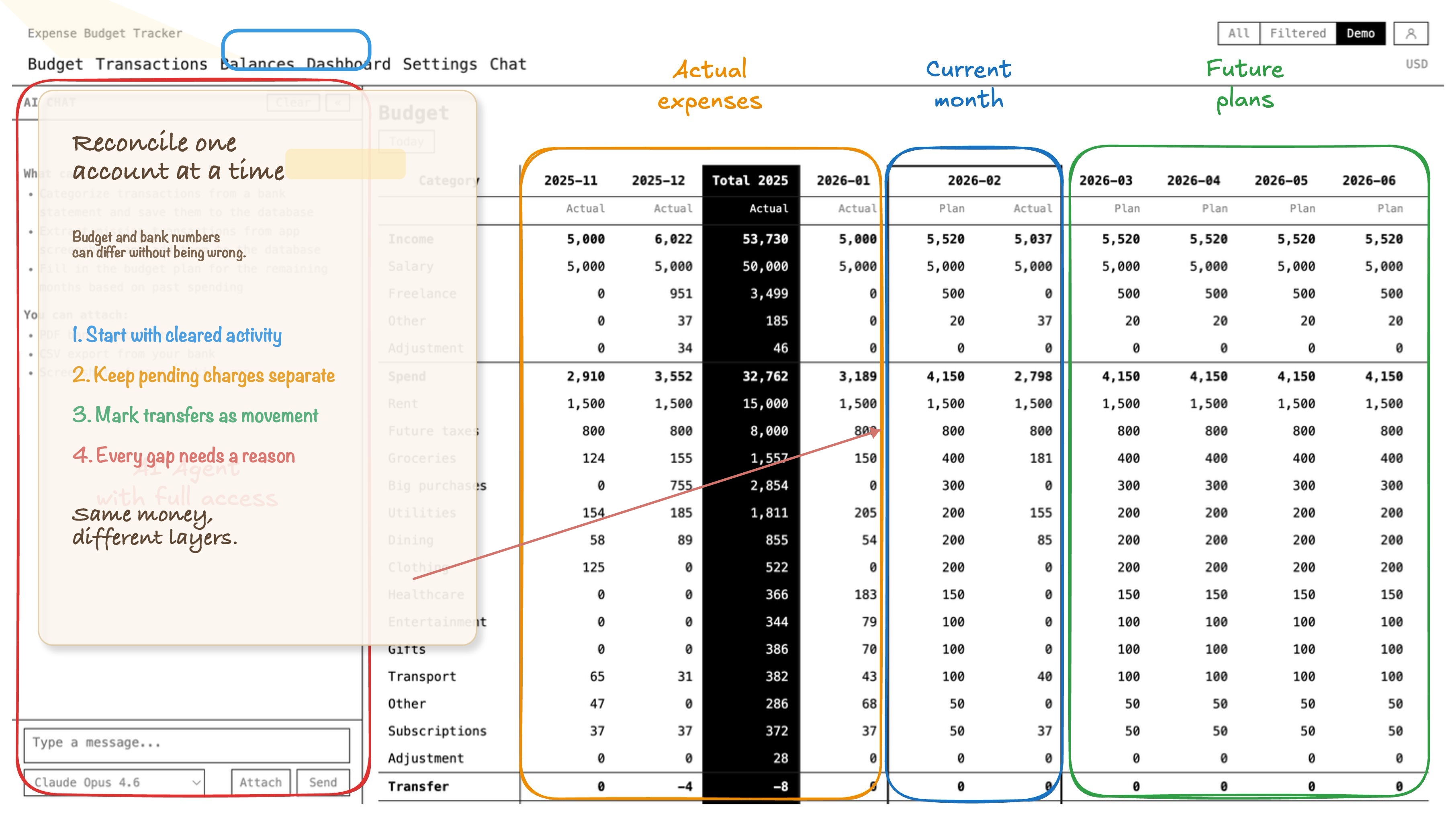
Your budget and your bank balance are not the same measurement
This is the part that saves a lot of unnecessary panic.
Your budget answers questions like:
- what categories did the money go to
- what is left for groceries, rent, travel, or subscriptions
- what is planned for the rest of the month
Your bank balance answers a different question:
- how much cash is sitting in this account right now
Those are connected, but they are not interchangeable.
If you buy groceries on a credit card, the grocery category should move right away. Your checking account should not.
If you transfer money from checking to savings, your checking balance should drop. Your budget spending should not increase.
If you plan next month's insurance payment in advance, that is useful planning. It still should not change today's reconciled account balance.
That is why budget reconciliation is not about making your category totals equal one account balance. It is about making sure every difference has a clean explanation.
Start by asking whether the mismatch is real or expected
Before you hunt for an error, decide what kind of gap you are looking at.
Also check which bank number you are using. Many bank apps show some mix of current balance, available balance, cleared balance, and pending activity. For reconciliation, start with posted or cleared transactions. Pending items matter, but they should be tracked as pending, not mixed into your confirmed account balance.
Some differences are normal:
- pending debit card charges that have not fully posted yet
- credit card purchases that hit the budget before cash leaves checking
- transfers between your own accounts
- future planned expenses that belong in projection, not in today's account balance
- deposits that are initiated but not settled
Other differences are not normal:
- a missing transaction
- a duplicated import
- a transfer categorized as spending
- a wrong starting balance
- a bank fee, refund, or cash withdrawal that never made it into the budget
That distinction matters because a lot of people try to "fix" expected timing differences as if they were bookkeeping errors.
The five mismatch patterns I would check first
If your budget and bank balance do not match, these are the places I would inspect first.
1. A transfer got treated like spending
This is one of the most common causes.
Moving money between checking and savings is not a new expense. Paying a credit card bill is not a new expense either if the original card purchases were already recorded in their categories.
When a transfer gets labeled as groceries, bills, or some catch-all category, the budget inflates spending and the account balances stop making sense.
If you use more than one account, this gets messy fast. This article goes deeper:
2. Card spending hit the budget before cash left checking
This one is not always an error. Often it is just timing.
Suppose you spend 90 dollars on a credit card today. Your food category should reflect that purchase today. Your checking balance should only move later, when you pay the card.
If you compare your full category budget to one checking account without accounting for card timing, the numbers will look strange even when the system is working correctly.
That is why I would reconcile each account on its own terms first, then look at the broader budget.
If card timing is the main source of confusion, start here too:
3. Pending transactions are making the balance look wrong
Banks are not always synchronized with your budgeting workflow at the exact moment you look.
You might have:
- a card charge that shows as pending in the bank
- a paycheck that is visible but not fully settled
- a restaurant tip that posts at a slightly different final amount
- a debit hold that disappears later
If you reconcile against a live balance that includes in-flight activity, the account can look wrong for a day or two even when nothing is actually broken.
That does not mean you should ignore it. It means you should label it correctly: pending, not unexplained. A pending transaction is not proof that your budget is wrong.
4. The starting balance or last reconciliation point was wrong
Sometimes the new transactions are fine and the problem is older.
If the account was already off by 87 dollars last week, this week's perfect transaction entry will not rescue it.
That is why reconciliation works better when you anchor it to a known-good point:
- the last statement ending balance
- the last date when the account definitely matched
- the most recent import or manual cleanup session you trust
Without that anchor, people end up reviewing twenty recent transactions when the real error happened three weeks earlier.
5. One small transaction never got recorded
This is the boring answer, which is exactly why it happens so often.
Think about:
- ATM withdrawals
- bank fees
- refunds
- cash spending
- reimbursements
- subscriptions renewed on an old card
None of these are conceptually hard. They just disappear easily when the budget is maintained across banking apps, screenshots, notes, and memory.
If cash tracking is part of the mess, this piece is relevant:
A practical reconciliation workflow that does not become a second job
When I need to reconcile an account, I keep it mechanical.
1. Compare one bank account to one account in the budget
Do not start with your entire financial life.
Pick one account and compare:
- the cleared or posted bank balance
- the corresponding account balance in your budget system
If your bank shows pending transactions separately, keep them in a short side list. Do not fold them into the cleared comparison yet.
If you use several accounts, reconcile them one by one. Trying to solve everything at household level too early is how people hide the real mismatch.
2. Review transactions since the last known-good date
Once you know when the account last matched, review only the period after that.
Look for:
- missing entries
- duplicated entries
- wrong amounts
- wrong account assignments
- wrong dates
This is where the search usually gets short and practical.
3. Separate spending from transfers
Ask a blunt question for every suspicious line:
Did money leave my financial system, or did it only move inside it?
If it stayed inside your own accounts, it should be treated as a transfer. If it paid for groceries, rent, or transport, it belongs in a spending category.
The same rule covers credit card payments. The purchase is spending. The payment is a transfer between accounts.
4. Check timing before declaring an error
If the account is off by an amount that matches a pending transaction, a card payment not yet posted, or a deposit in flight, note that explicitly.
Expected timing differences still need to be understood. They just do not need category surgery.
5. Once the account matches, review the category impact
After the account is reconciled, make sure the corrected transactions still tell the truth at category level.
This matters because account-level truth and category-level truth are not the same thing. An account can match while the categories are still nonsense. For example:
- a transfer may be in the right account but the wrong category
- a refund may have restored cash but not the original category
- a shared expense reimbursement may have landed as income instead of reducing the category
Reconciliation is finished only when both layers make sense.
A quick example of why the numbers drift
This is a normal week, not a broken one:
| Date | What happened | Budget effect | Checking effect |
|---|---|---|---|
| April 22 | 68 dollar grocery purchase on credit card | Groceries increase | No immediate change |
| April 23 | 400 dollar transfer to savings | No new spending | Checking decreases |
| April 24 | 19 dollar streaming renewal on debit card | Subscriptions increase | Checking decreases |
| April 25 | Credit card payment posts | No new category spend | Checking decreases |
If you expect one checking account to mirror all category activity directly, this week will look wrong.
It is not wrong. It just needs the events classified properly.
This is different from importing bank statements
It is related, but it is not the same job.
If the real problem is that half the month never made it into your budget, you probably need a better data-entry workflow first. That is where statement import helps:
This article is about the next step.
You already have transactions, categories, and balances somewhere. Now you need to prove they agree, account by account and category by category.
How to stop the drift from coming back
The easiest way to make reconciliation painful is to postpone it until the gap turns into historical fiction.
I would rather keep it light and frequent:
- reconcile weekly or after each statement import
- keep transfers explicit instead of hiding them inside spending categories
- record card purchases when they happen, then record card payments as transfers
- keep projected planning separate from today's cleared balances
- reconcile each account individually before trusting the household total
If bill timing keeps creating confusion, a forward-looking calendar helps a lot:
Where Expense Budget Tracker fits
Expense Budget Tracker is useful for this kind of bank balance budgeting because it keeps the parts that usually drift apart in one system:
- account balances
- category budgeting
- transfers between accounts
- projected planning for future months
- statement imports when the transaction history lives outside the app
- shared workspaces when more than one person touches the money
That setup matters because reconciliation usually breaks when one person is looking at categories, another is looking at bank apps, and nobody is fully sure which transfer already got counted where.
Keeping balances, transfers, and category history in the same workspace does not make reconciliation glamorous. It just makes it shorter.
The rule worth keeping
Do not ask one bank balance to explain your whole budget.
Reconcile accounts at the account level, categories at the category level, and treat pending activity as pending until it clears.
That is the cleaner way to reconcile your budget with your bank balance without turning every mismatch into detective work.